

Parking signs, explained in plain English.
Point your phone at any sign. See what you can do, what to watch, and what to avoid — then set a timer and park with confidence.
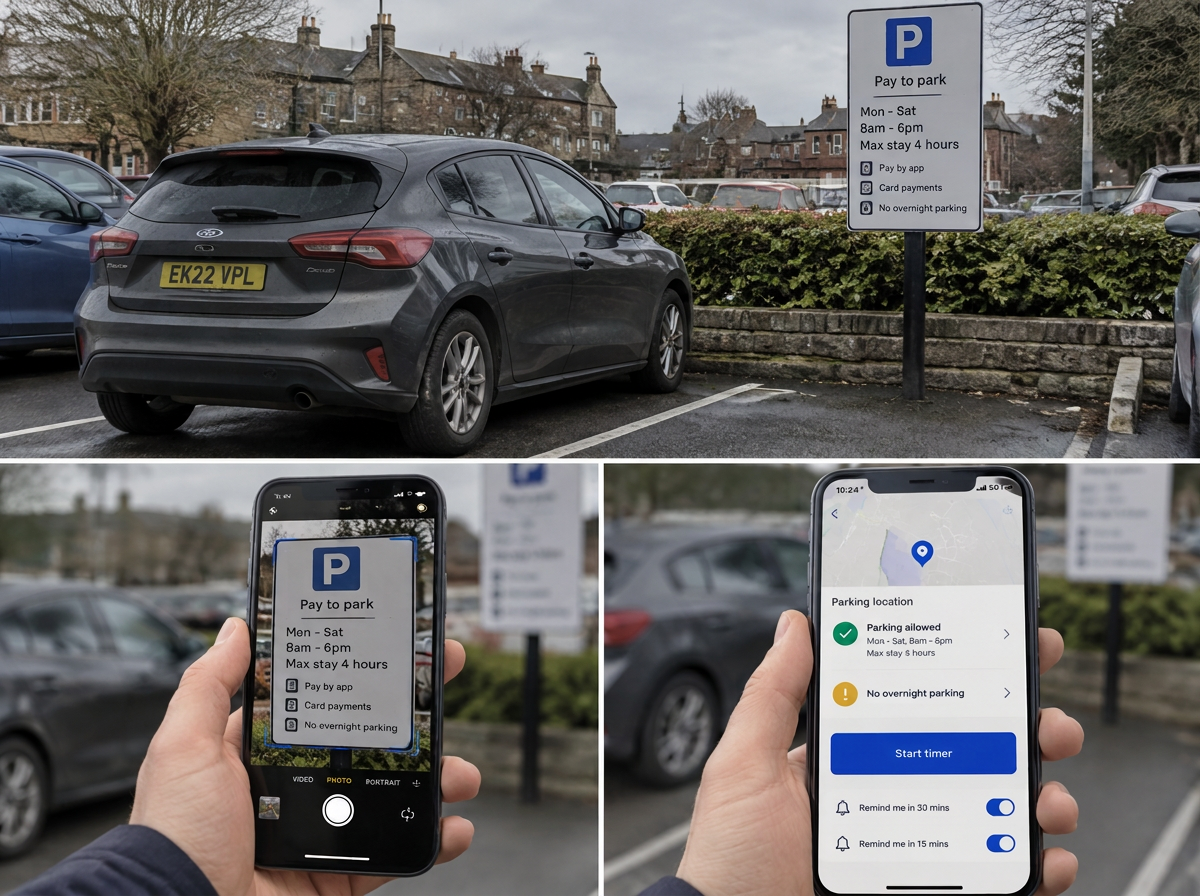
User interface used in image is for illustration purposes only and for reference. Actual interface may vary
Get started in three simple steps
From sign-up to your first parking decision in under a minute.
Create your free account
Sign up with email in seconds. No credit card needed to start scanning.
Snap your first sign
Take a photo of any parking sign. Our AI reads the restrictions and operator details.
Park with confidence
Get a clear summary, set your duration, and let the timer keep you on track.
How Park Pal Pro works
Turn a confusing parking sign into a clear decision in seconds.
Snap the sign
Use your camera or photo library. The AI extracts times, limits, permits and operator info.
Read the traffic-light rules
Green means go, amber means watch the conditions, red means avoid. No more small-print guessing.
Confirm location and duration
Check the car park name, street and start time. Choose how long you need to stay.
Get back before it expires
Reminders alert you 30 and 15 minutes before your time is up. If the operator supports app payment, we link you straight there.
Add Park Pal Pro to your phone
Park Pal Pro is a web app, so there is nothing to download from an app store. Add it to your home screen and it opens just like a native app.
- iPhone (Safari): tap the share button, then choose "Add to Home Screen".
- Android (Chrome): tap the menu (three dots), then choose "Add to Home screen" or "Install app".
Once added, you can tap the icon from your home screen to scan a sign straight away.
Simple pricing. One avoided fine pays for years.
Parking signs are confusing on purpose. A Penalty Charge Notice costs £60–£130. Park Pal Pro costs less than the loose change in your cup holder.
Free
Scan it. Understand it. Time it.
For the driver who parks in town now and then and wants a straight answer from a confusing sign.
- 1 sign scan per week, in plain English
- Traffic-light rules: safe, caution, warning
- Parking timer with 30 and 15 minute alerts
- Search the public Locations library
- Your original photo kept as evidence
New accounts get 7 days of Pro+ free, so you can try everything first.
Pro+
Fight back with evidence.
For the regular town-centre driver, commuter, delivery or trade driver — anyone who parks under pressure and can't afford a £60 mistake.
- 3 scans per week, up to 6 photos per scan
- AI-drafted PCN challenge letters from your saved scans, photos, GPS and timestamps
- Unlimited letter re-drafts and full version history
- Extra sign photo within 60 minutes of your first scan
- Blue Badge details carried into your challenge letters
One avoided fine covers Pro+ for over four years.
PCN Pass
Just got a ticket? Fight it today. No subscription.
For the driver staring at a penalty notice who wants help right now, not a monthly plan.
- 7 days of full Pro+ features
- AI-drafted challenge letter from your evidence
- Unlimited re-drafts while your pass is live
- Expires automatically — nothing to cancel, no renewal
A PCN is £60–£130. This pass is £2.99.
New accounts get 7 days of Pro+ free. Cancel or switch any time.
Frequently asked questions
Everything you need to know before your first scan.
Is Park Pal Pro free to use?
Yes. The free plan lets you scan parking signs, read the traffic-light summary and set return timers. Pro+ adds PCN challenge letters, more scans and extra photos per session.
How accurate is the sign reading?
The AI reads the sign text and summarises it in plain English, and we always keep your original photo. It is a guide, not legal advice — please check the sign yourself before you park.
Do I need to allow camera and location access?
Camera access is needed to photograph the sign. Location is optional but recommended: it stamps your scan with GPS coordinates, which strengthens your evidence if you ever get a fine.
How do the reminders work?
When you set a duration, we start a countdown and alert you 30 and 15 minutes before it expires. You can also add the session to your phone calendar with the same alerts.
Can I pay for parking through the app?
For supported operators such as RingGo or PayByPhone, we link you to their own app or website. If the operator's app is not installed, we send you to the Apple App Store or Google Play Store so you can download it. We do not process any parking payments ourselves.
What happens if I get a PCN?
Pro+ can help draft a challenge letter using the photos, location and time captured when you parked. You must also upload the penalty letters and any other evidence, and it is your responsibility to check the draft, fill in any missing information, and send the challenge if you choose to do so. Read our guide to appealing a parking fine. Park Pal Pro does not accept any liability for any PCN you receive, for any challenge you dispute, or for the outcome of any dispute. Responsibility remains with you as the driver and with the operator of the vehicle and the parking site.
Why should I pay for Pro+?
Because the average PCN is £60–£130 and Pro+ is £1.99 a month. One avoided or successfully challenged fine pays for over two and a half years of monthly Pro+, or over four years on the annual plan. Pro+ also gives you 3 scans a week with up to 6 photos each, so your evidence pack is strong enough to stand behind a challenge letter.
I only ever get one ticket. Why would I subscribe?
You probably shouldn't — that is exactly what the PCN Pass is for. £2.99, one-off, seven days of everything, then it switches itself off. No subscription, no renewal, nothing to cancel. If you find you park in tricky spots more often than you thought, Pro+ is there when you want it.
Can I cancel whenever I like?
Yes. Monthly rolls month to month and stops when you stop it, and you can move back to Free from your profile at any time. The PCN Pass never renews — it simply expires after 7 days.
Is there a catch with the 7-day Pro+ trial?
No. Every new account starts with 7 days of full Pro+ access, automatically. When it ends you move to the free plan — you are never charged, because we never took your card. Upgrade only if you want to keep the Pro+ features.
Do you sell my data to pay for the free plan?
No. Your scans, photos and location history are yours. We do not sell personal data and we do not use it for personalised third-party advertising.
Ready to stop guessing at parking signs?
Create a free account, scan your first sign, and keep a time-stamped record of every visit.
Create your free account